
Getting Started with Alexa
Dwell’s Alexa skill lets you listen to Scripture, listening plans, and devotionals completely hands-free—perfect for mornings, evenings, or listening throughout your home.
This guide will walk you through setting up the skill, linking your account, and using basic voice commands.
What You’ll Need
Before getting started, make sure you have:
- An Amazon Alexa–enabled device (Echo, Echo Dot, Echo Show, etc.)
- The Amazon Alexa app installed on your phone or tablet
- An active Dwell subscription
- An active internet connection
Step 1: Enable the Dwell Skill
You can enable the Dwell Alexa skill in two different ways: through the Dwell app or through the Alexa app.
While both options work, we recommend starting in the Dwell app, as it provides the smoothest setup and account-linking experience.
Option A: Enable the Skill from the Dwell App (Recommended)
- Tap here to open the Dwell app on your phone. You should land on the Dwell + Alexa screen, located in Settings
- You can also click the settings gearshift in the top left hand corner of the Dwell screen. And then click "Integrations", followed by "Alexa"
-
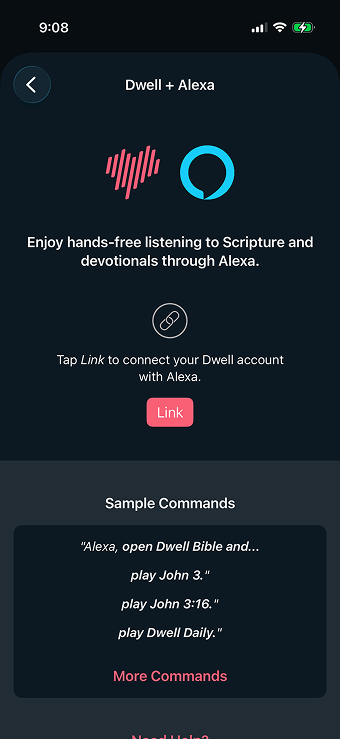
Dwell + Alexa Screen - Tap the “Link” button on your screen
- Follow the prompts to enable the Dwell skill.
Option B: Enable the Skill from the Alexa App
- Open the Amazon Alexa app.
- Tap More (☰) in the bottom-right corner.
- Select Skills & Games.
- Search for Dwell.
- Tap Enable to Use.
If you enable the skill through the Alexa app, you’ll still need to link your Dwell account before listening. Follow instructions in Option A.
Step 3: Start Listening with Voice Commands
You can control Dwell entirely with your voice. Start by saying:
“Alexa, open [Dwell Bible]."
That said, it's faster to just say both commands "open" and "play" at the same time. For example:
“Alexa, open [Dwell Bible] and play [Proverbs Daily].”
Content You Can Ask Alexa to Play:
Book of the Bible
Book of the Bible + Chapter
Book of the Bible + Chapter + Verse
Listening Plan Title
Devotional Name
Book of the Bible Example:
“Alexa, open [Dwell Bible] and play [the book of Romans].”
Book of the Bible + Chapter Example:
“Alexa, open [Dwell Bible] and play [Matthew] chapter [5].”
Book of the Bible + Chapter + Verse Example:
“Alexa, open [Dwell Bible] and play [Matthew] chapter [5] verse [4].”
Listening Plan Example:
“Alexa, open [Dwell Bible] and play [The Straight Thru Plan].”
Devotional Example:
“Alexa, open [Dwell Bible] and play [The Melodic Line].”
Unsupported Content At This Time
Audiobooks
Playlists
Unsupported Voice Commands
At this time, Alexa doesn’t support voice commands for Up Next. Also, commands like "Alexa, play my listening plan" are not supported yet.
Troubleshooting Common Issues
If something isn’t working as expected, try the following:
- Make sure your Alexa device is connected to Wi‑Fi
- Confirm your Dwell account is linked in the Alexa app
- Try saying “Alexa, open Dwell Bible” again
- Disable and re‑enable the Dwell skill
Need More Help?
If you have questions or need additional help using Dwell with Alexa, email us at help@dwellapp.io.
We’re glad you’re listening with Dwell and hope Alexa helps make Scripture a natural part of your everyday life.